The spreadsheet
Inside the spreadsheet
A browsable catalogue of items other shoppers found on Chinese marketplaces, which you then order through an agent. This page covers what each entry tells you and how to use one without wasting money on dead links.
On this page
- What is inside a spreadsheet
- Why use one at all
- Turning a listing into an order
- Three ways to reach the same item
- Why links go dead
- Where to browse
Definition
What is inside an ACBuy spreadsheet
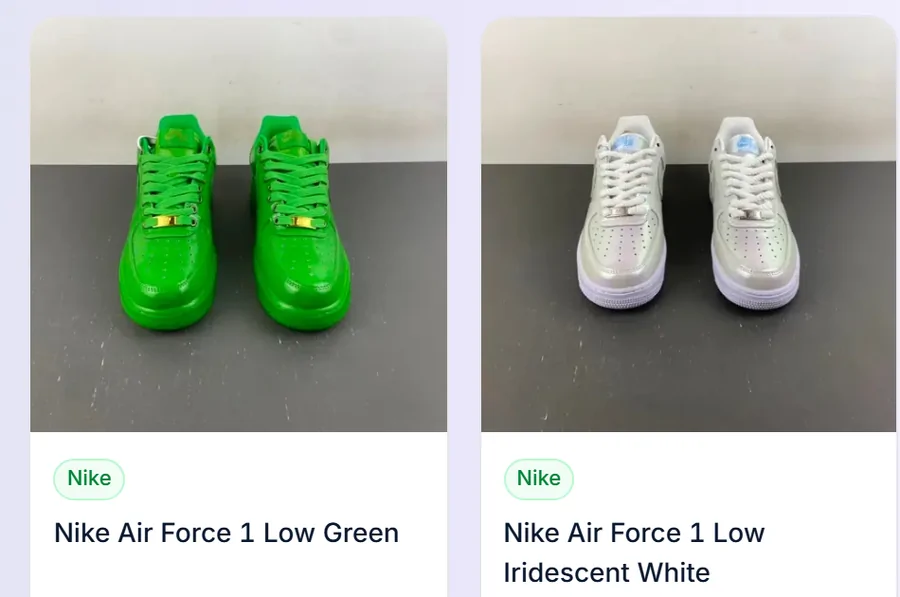
An ACBuy spreadsheet is a curated product catalogue: a browsable listing of items other shoppers found on Chinese marketplaces, grouped by category, each entry carrying a photo, a name and a link.
You open a category, scroll the finds, and when something is worth having you open that item and hand its marketplace link to ACBuy. Nothing is sold on the catalogue itself. It is a shop window with no till.
That model explains the division of labour across the rest of this site. The catalogue is good at showing you what exists. The agent is the only party that can actually buy it and ship it.
Why a spreadsheet saves you the marketplace search
You can search Taobao or 1688 directly. Two things make that painful. The interface and the listings are in Chinese, and even once you can read them, nothing on the page tells you which of forty near-identical sellers is the one people are happy with.
A curated catalogue removes both problems at once. Somebody already opened the listing, judged it, and put it in front of you under a category name in English. That is a real shortcut, and it is the only thing a spreadsheet does.
Be equally clear about the limits. An entry is an opinion with a link attached. It does not track stock, it does not update when a seller disappears, and nobody audits the notes. Treat it as a shortlist from someone who went first, then do your own last check on the marketplace page before you pay.
Turning a listing into an ACBuy order
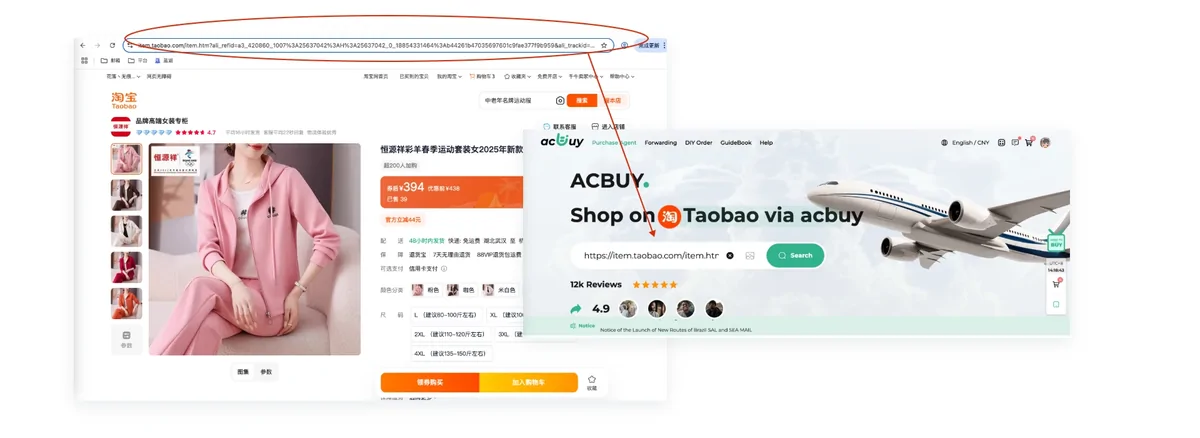
Open the entry, then copy the marketplace URL it points at. On ACBuy, paste that URL into the search box at the top of the site. ACBuy states that it can pull product information automatically for 99 percent of Taobao, Tmall and 1688 pages, which means colour, size and quantity appear as normal selectors rather than as free text you have to describe.
When a link cannot be read automatically you are redirected to the DIY Order page instead. That is not an error. It means a human buyer will complete the purchase from the details you type in, so be specific about colour and size there.
From that point the process is identical for every item, and the nine steps takes over.
Source: ACBuy shopping guide, beginner guide, step 1 and step 2. Checked 2026-08-03.
Three ways to reach the same item
A catalogue is only one route in. ACBuy's guide lists three, and they fail in different ways, so knowing all three is worth a few minutes.
Paste the link
Fastest and most exact. The entry already carries the seller whoever built the catalogue trusted. Use this whenever the listing is fresh.
Search by name
Type the product name into ACBuy and pick from Taobao, Tmall or JD results. Useful when a link has gone dead and you need the same item from a different seller.
Search by image
Upload a picture and let the marketplace match it. This is the one that rescues a screenshot with no link attached.
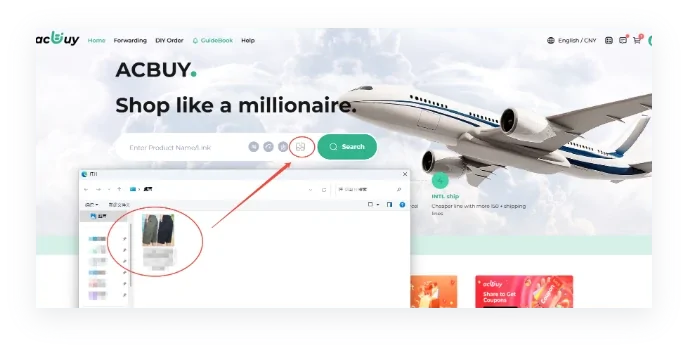
The image search control sits inside the ACBuy search bar. When all three fail
Use the DIY Order page and describe the item. A human buyer sources it. Expect a slower turnaround and answer any questions the buyer sends you.
Catalogue hygiene
Why links go dead, and what to do about it
Marketplace URLs are not permanent. Sellers close listings, run out of a colourway, or relist the same item under a new ID. A catalogue cannot know that, so older sections slowly fill with entries that open a page saying nothing is here.
Three habits deal with almost all of it:
- Open the entry and check the live marketplace page before you plan a whole order around it. A dead link found early costs nothing.
- If the link is dead, copy the item name into ACBuy search rather than hunting for another catalogue. The same product usually exists under several sellers.
- If an entry points at a store front or a page of search results rather than one product, an agent cannot buy it. Open it, pick the exact item, and use that link instead.
None of this is a reason to distrust catalogues. It is the ordinary maintenance cost of linking to somebody else's shop.
Where to browse listings worth using
This guide does not host a catalogue. Discovery happens in a listing that groups finds by what the item is rather than by who posted them. That is far easier to shop from than one long undifferentiated list, especially when you only want one category.
Start with the categories page for the twelve that behave predictably on a first order, or go straight to a category if you already know what you want.
Not all lists are equal
How to judge a finds list before you trust it
Anyone can publish a page of links. What separates a list worth using from an abandoned one is maintenance, and maintenance leaves marks you can check in about two minutes.
Open five entries at random. If more than one lands on a removed listing, nobody is sweeping that list and the rest of it is likely the same vintage. Check whether entries carry a note from whoever added them or only a title lifted from the marketplace, because the note is the part a scraper cannot produce. See whether categories are genuinely sorted or whether everything has been tipped into one long page with a search box bolted on. Then look for a date anywhere at all.
Hold this site to the same test. The change log carries dates, every figure on these pages carries the day it was read, and the categories here are the ones the catalogue itself publishes rather than a set invented for this site. When any of that stops being true, the test has told you something.